Sketching interaction stories with markers and iPhones
I recently posted about Bill Buxton's book, "Sketching User Experiences"
The problem at hand involved concepting a number of new features for an existing website, and sharing these concepts with a remote team. (When you can't get everyone in the same room, it's key that the team can quickly share ideas.) [Ed., and remember, it's 2009 in this story.]
For this session, we used:
- Whiteboards
- Paper
- Markers, scissors, and tape
- iPhones
- Keynote
The goals were to:
- Tell a story
- Leave room for creative thinking
- Validate concepts
- Align thinking
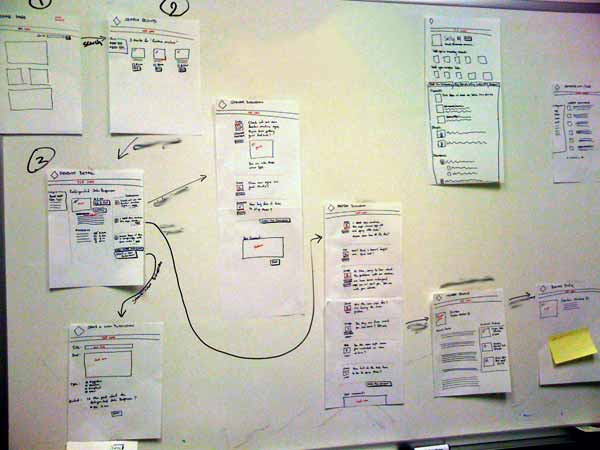
After open brainstorming and traditional white-boarding, a number of concepts were quickly sketched on paper (generally one sheet per screen.) These screen sketches were taped to a whiteboard, allowing quick note-taking and annotations:
After walking through the concepts (and iterating) with a number of local victims, the screens were captured with an iPhone camera and pulled-into Keynote to create the storyboards. With each screen as a slide, a story can be told within the presentation format:
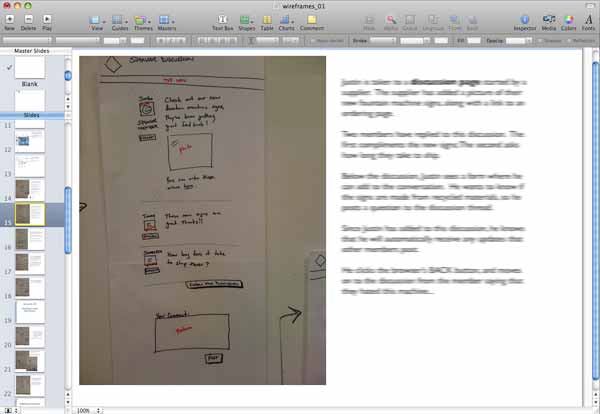
Using this approach, stories can be shared globally, and changed in minutes. The hand-drawn images ensure that no-one gets hung-up on colors or copy, and they require a little creativity on the part of the reader, which gets the gears turning and leads to fantastic questions.