Caps Lock keymap swap on OS X
I was mucking around with the keymap on my Linux box last night, trying to make it feel a little more comfortable. I'm using an Apple Pro keyboard (I like them, and they're cheap) which has the control key in the far, lower left corner. On OS X this normally isn't an issue since the Command key is used more often; However, under X, Control is the primary modifier, and you start to notice how much of a stretch that key is for the pinky. I played around with a few settings, but I eventually I settled on swapping the control and caps lock keys, so that control is now to the left of 'A'. I quickly realized why so many people use this setup -- it really is less stressful on the hands.
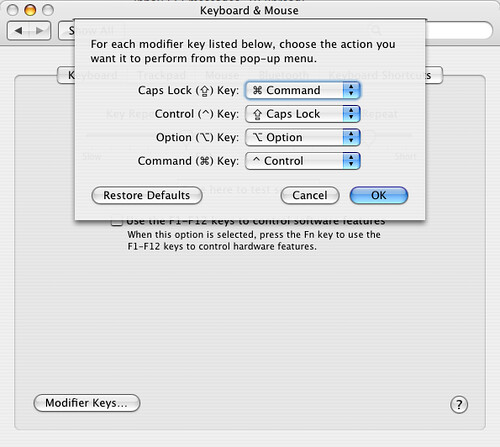
It took a little brain rewiring to get used to this new setup, but I became comfortable with it rather quickly -- that is, until I got to work in the morning and sat down at my OS X machine. Bouncing between machines with different keymaps is a pain, so I decided to try remapping the keys on my Mac as well. A few google searches found a number of kernel hacks for 10.1 through 10.3, but I noticed that they all seemed to be abandoned projects. After adding "10.4" to my search query, I quickly found out why: remapping the control keys is just a System Preference. Woo hoo!
The screenshot below shows the "Modifier Key..." dialog within the "Keyboard & Mouse" System Preference panel: